A good car mount does one job: it keeps a phone stable and visible for a pre-set navigation route or hands-free call without turning the screen into the center of your drive. The “visible” part matters less than the “pre-set” part. A mount cannot make scrolling, typing, or troubleshooting directions safe at speed. Set the route, audio, and focus mode before moving; pull over when something needs attention.
We researched current manufacturer mounting systems, manuals, compatibility notes, installation requirements, and charging options for this guide. We have not claimed road testing. The right mount depends heavily on the vehicle, phone, case, dashboard shape, local driving rules, and whether you need charging. Confirm that the installed position preserves your view of the road and does not obstruct vehicle controls, vents you rely on, cameras, sensors, or airbag areas.
Our picks at a glance
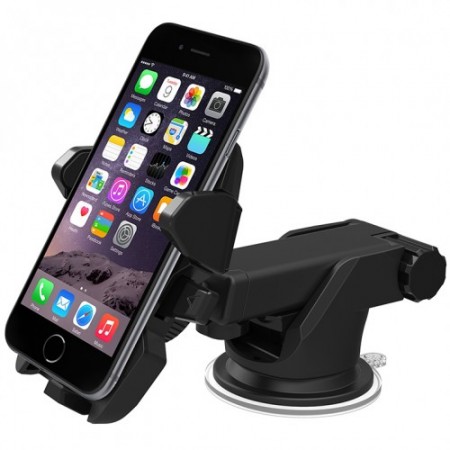
Best universal clamp mount: iOttie Easy One Touch 6. A strong first choice when you need a holder that works with many phones and cases. Its self-centering arms, adjustable bottom foot, cable organizer, and multiple mounting styles make it more flexible than a magnetic mount. Check iOttie Easy One Touch 6 options on Amazon.
Best custom-fit system: ProClip vehicle-specific mount and holder. Spend more here when you drive the same vehicle for years, dislike wobble, or want an exact dashboard location. ProClip uses a separate vehicle-specific base and device holder, so you must select both pieces carefully. Check ProClip car-mount options on Amazon.
Best magnetic charging setup: ProClip MagicMount Charge Elite or Charge Pro system. This is the premium convenience pick for a compatible MagSafe or Qi2 phone and case. A vehicle-specific base keeps the magnetic charging holder rigid, but the full setup costs more than a simple clamp mount. Check ProClip charging-mount options on Amazon.
Safety comes before the mount style
Use a mount to reduce loose-phone distraction, not to create a second dashboard. The safest screen interaction is the interaction you complete while parked. Enter destinations before you leave, use voice control only when it works reliably for you, and do not reach toward the display to reply to a message or browse music. Hands-free does not mean attention-free.
Mount placement is a safety decision. A phone should not block a large section of windshield, cover dashboard warning lights, obstruct a camera or sensor, interfere with a control, or sit in the deployment path of an airbag. Every vehicle is different, which is why a generic “best placement” is not useful advice. Sit in the driver’s seat, try the position with the phone attached, and confirm you can glance at navigation without shifting your posture or taking your eyes far from the road.
Local rules can limit where you place a device and how you use it while driving. Check the rules where you drive and keep the mount in a legal, unobstructed location. If the installation instructions or your vehicle manual warn against a spot, choose a different system. No bargain mount is worth a broken vent, a blocked safety control, or a poor sightline.
Why the iOttie Easy One Touch 6 is the universal pick
The iOttie Easy One Touch 6 is the most practical option for a large share of drivers because it does not depend on a magnet, a particular case, or a vehicle-specific fit. The cradle’s self-centering arms grip the phone mechanically. You press the phone into the trigger to close the arms and use release bars to remove it. An adjustable bottom foot accommodates different phone heights, which is useful for larger models and many protective cases.
The Easy One Touch 6 line comes in dash-and-windshield, air-vent, CD-slot, and vehicle-screen versions. That variety is useful, but it means you should not buy by name alone. Pick the actual attachment type that fits your vehicle. A dash-and-windshield model has the most flexibility because its arm can be adjusted, but it can be too prominent in a shallow cabin. An air-vent mount saves space, but it may block airflow and asks a plastic vent louver to support a heavy phone. A CD-slot mount can be steady in an older vehicle with an unused slot, but it is obviously not an option in every car.
iOttie’s current design includes a telescopic arm on the dashboard version, a rotating ball joint, and a built-in cord organizer. The arm and ball joint let you position the screen in portrait or landscape orientation, while the cord organizer keeps a charging cable from hanging across the cabin. These are modest details, but they are the difference between a mount you use every day and one that feels improvised.
Choose this model if your phone changes often, your case is thick, or you want the simplest low-to-mid-priced route to a secure hold. The drawback is that universal mounts are still universal: a dashboard, windshield, vent, or CD slot is not engineered around your exact vehicle. On very rough roads or in unusually shaped interiors, a custom-fit base may be worth the additional cost.
Why a ProClip custom system is worth it for the right driver
A ProClip vehicle-specific mount is not one product in a box. It is a two-part system: a mounting base designed for a particular year, make, and model of vehicle, plus a holder chosen for the phone and case. The base is designed to clip into dashboard trim seams without drilling or adhesive. The holder attaches to that base. This is the important thing to understand before ordering: a base alone does not hold your phone, and a holder alone does not create a complete installation.
The benefit of that extra selection work is stability. A well-matched base positions the phone where the dashboard geometry supports it instead of asking a vent louver or suction cup to manage weight and vibration. It is a strong choice for a driver who spends many hours in the same car, drives on rougher roads, or is tired of a windshield arm slowly creeping out of position. It also gives you a clean upgrade path: when you change phones, you may need only a new holder; when you change vehicles, you may need only a new base.
ProClip offers universal cradle, magnetic, wired-charging, and wireless-charging holder choices. That is a feature, not a reason to rush. Start with the vehicle base, then decide how the phone should be secured. A universal mechanical cradle is the safest option for a heavy case or a phone without a compatible magnetic ring. A magnetic holder is quick and uncluttered, but it requires the phone or case to have the right magnetic compatibility.
Skip a ProClip system if you lease frequently, change vehicles often, or simply need an inexpensive mount for occasional trips. Its vehicle-specific precision is most valuable when you are committed to the car and care about a clean, stable, near-factory result. Check the exact compatibility for your vehicle and phone before buying, especially if the phone is a foldable or wears a wallet-style case.
Why magnetic charging mounts are a premium convenience, not a requirement
The ProClip MagicMount Charge Elite or Charge Pro system is the right type of upgrade for a driver who wants a one-handed placement and automatic charging routine. With a compatible MagSafe or Qi2 phone and case, the magnetic ring aligns the device with the charging surface while holding it in place. There is no cable to plug into the phone at every stop.
The charging holder is still only part of the setup. It attaches to a vehicle-specific ProClip base, and it needs appropriate power. ProClip says its current wireless charging holders can connect to an included 12-volt adapter or a 20-watt USB-C source, depending on the configuration. Check the current kit contents, phone compatibility, case compatibility, and power requirement before buying. A magnetic ring that holds a phone does not guarantee that it supports the same level of wireless charging.
Wireless charging in a car is convenient, but it is not magic. Navigation, sunlight, a thick case, and a warm cabin can make a phone hot. If your phone becomes uncomfortably warm or charging slows, improve airflow, remove a nonessential insulating case, or use a wired cable when appropriate. Do not mount a phone directly over a heating vent in winter or a strong air-conditioning vent in summer without considering whether the airflow will affect the screen or mount.
Buy a magnetic charging system when you make frequent short trips and want the phone to be charged every time you get in the car. Skip it when you only need navigation on occasional road trips, use a non-magnetic case, or prefer the reliability and lower cost of a clamp plus a quality cable. Our guide to USB-C cables is useful if you take the wired route and want a cable that is long enough for safe routing without becoming a tangle.
Mount types: the good and the awkward
Dashboard mounts: These can offer the most solid and sensible placement when there is a flat, supported surface or an exact-fit mounting base. They are typically the best choice for a long-term installation. Check that adhesive pads, if used, are compatible with your dashboard material and will not block a display or control.
Windshield mounts: They are easy to position and remove, but may crowd your line of sight or conflict with local rules. Use them only where legal and where the phone remains low enough to preserve a clear view.
Air-vent mounts: These are compact and often inexpensive. They are best for lighter phones in vehicles with sturdy, well-placed vents. They are a poor fit when the phone blocks your climate control, the vent slats are delicate, or your route involves rough roads.
CD-slot mounts: They can be secure in vehicles that have an unused CD slot, but are unavailable in many newer cars and may interfere with nearby controls. Treat them as a vehicle-specific solution, not a universal category winner.
Cup-holder and seat-rail mounts: These are worth considering when the dashboard and windshield cannot accept a phone safely. The downside is reach: a phone mounted low may force longer glances away from the road, so keep the display simple and use audio directions.
What to check before you order
Measure the phone with the case on. A mount that fits the bare phone may not fit a rugged case, a battery case, or a foldable. For clamp mounts, check the stated maximum width and depth. For magnetic mounts, confirm the case supports MagSafe or Qi2 alignment rather than merely having a decorative metal plate. A poorly aligned magnetic accessory may hold the phone weakly or charge inconsistently.
Look at your interior in daylight. Where will the cable go? Does the steering wheel hide the screen in one position? Will a passenger bump the mount? Does the attachment block a hazard button, gear selector, camera, or climate-control knob? Can the phone be removed with one hand while parked without yanking the whole mount? These questions reveal more than an online product photo.
For a vehicle-specific setup, be exact about the year, trim, dashboard screen layout, and phone model. A small trim change can alter the mounting point. For a universal mount, clean the surface exactly as directed and give the attachment time to settle before relying on it. Do not use an adhesive mount on a surface that is dusty, oily, textured beyond the maker’s guidance, or extremely hot.
A practical price ladder
Budget to midrange: A mechanical universal clamp like the iOttie Easy One Touch 6 is enough for most drivers. It works with many phones, does not demand a magnetic case, and leaves more budget for a dependable charging cable and vehicle power source.
Upper midrange: A ProClip vehicle base plus a basic compatible holder is a smart upgrade when stability and a tailored placement matter. You pay more and do more compatibility work, but you avoid the generic compromises of a vent clip or suction arm.
Premium: A vehicle-specific base paired with a magnetic Qi2 charging holder is the polished daily-driver solution. It is worth it for a compatible phone that is placed and removed several times a day. It is not worth it merely for the word “wireless”; a simple clamp and cable can be just as dependable for much less.
Installation, cleaning, and long-term use
Install the mount while parked in a level, well-lit place. Read the relevant vehicle and mount instructions first. Route charging cables so they do not cross pedals, wrap around the steering column, snag a passenger’s feet, or pull on the phone when you turn. Use a cable length appropriate to the route instead of stuffing excess cable in a loose loop.
Test the setup with your actual case and the heaviest phone configuration you use. Drive a short familiar route, then check the arm, clamp, base, and cable after you park. Tighten adjustment points only as directed; overtightening a plastic knob or pressing a vent clip too hard can create the problem you were trying to prevent.
Clean a clamp’s contact points and a magnetic mount’s face periodically. Grit can scratch a case, while dust or lint can reduce contact. If a suction cup loses grip and the maker permits cleaning, follow its current instructions rather than adding tape or adhesive improvisations. A mount that begins to sag, crack, or release the phone should be replaced, not coaxed along.
Frequently asked questions
Is a magnetic car mount safe for my phone?
A quality magnetic mount is appropriate for a compatible phone or case when installed correctly. The key is compatibility: use a case designed for the magnetic system and confirm that the mount’s hold is secure before driving. If you use cards with magnetic stripes in a wallet attachment, keep the accessory maker’s guidance in mind.
Should I use a windshield or dashboard mount?
Use the placement that is legal, stable, unobstructed, and easy to glance at without compromising your view. A vehicle-specific dashboard mount is often the cleanest long-term answer. A windshield mount is more flexible but can be visually intrusive and may be restricted in some places.
Why does wireless charging slow down in the car?
Heat, poor alignment, a thick case, an underpowered adapter, and heavy phone use can all limit charging. Check that the holder, case, and power source are compatible, keep the phone out of direct sun where possible, and use wired charging if you need the most predictable result.
Will a clamp mount fit a large phone case?
Many will, but measure the phone with its case and compare the dimensions to the mount’s current supported range. Extra-thick wallet cases and foldable phones deserve a specific compatibility check rather than an assumption.
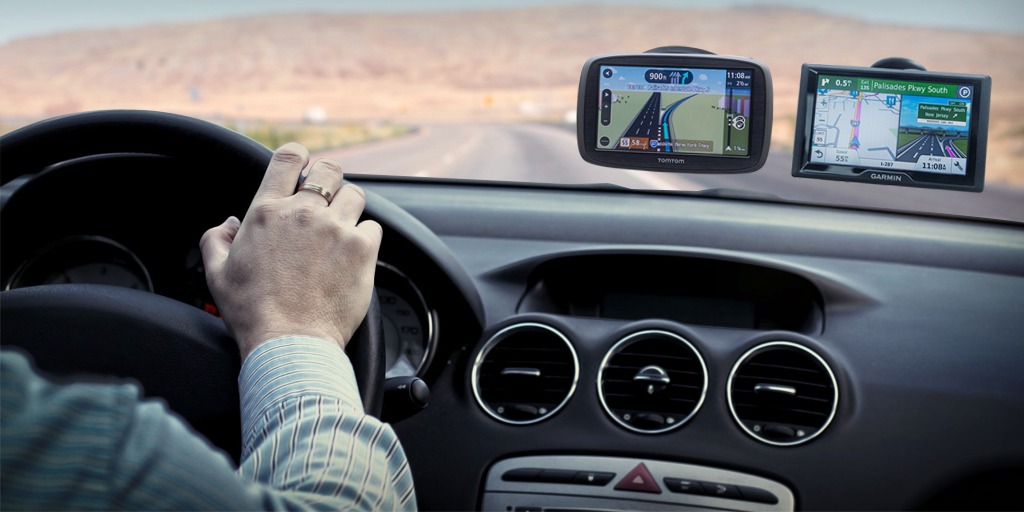
Can I use a car mount for a GPS unit?
Yes, provided the holder supports its dimensions and the installation preserves visibility and access to vehicle controls. A ProClip system can be particularly useful because its holders can be selected for phones, GPS units, and other devices separately from the vehicle-specific base.
The bottom line
Buy the iOttie Easy One Touch 6 when you want an affordable, flexible clamp mount that accommodates many phones and cases. Choose a ProClip vehicle-specific base and holder when you want a stable, tailored installation and are willing to select the two required pieces carefully. Upgrade to a ProClip magnetic charging system only when a compatible MagSafe or Qi2 phone and daily charging convenience justify the extra cost. In every case, set the phone up before you drive and make the mount a tool for less distraction—not more screen time.
For the rest of your on-the-road setup, see our guides to USB-C cables, travel power and charging, and flashlights.